Ascend 107 Get the app

Part 107 · Remote pilot knowledge test

Learn the why. The test becomes a measurement.

Ascend 107 is a study app for iPhone and iPad that teaches each Part 107 concept until you can reason it out, then measures how far you have climbed.

Coming soon to the App Store How it teaches

iPhone and iPadiOS 17 or laterNo accountWorks offline

An altimeter tape from 0 to 400 feet. The pass line is at 280 feet; the needle reads 300 feet, just above it. 0 100 200 300 400 PASS 280 FT AGL 300
Needle
Your readiness, in feet
280 ft
The pass line, 70% of the scale
400 ft
Top of the tape, the Part 107 altitude limit

IThe problem

A question bank teaches you to recognize answers. The test asks you to reason.

The usual way to prepare is a pool of questions with an explanation under each. Drill it long enough and the right letter starts to look familiar. That is recognition, and it gives way the first time a question is worded differently, or a chart shows an airport you have not seen before.

Ascend 107 starts at the other end. It teaches the concept first, asks how sure you are before it shows you anything, asks why when you get it right, and keeps a record of the wrong ideas you hold until each one is cleared.

Testing is the measuring instrument. Understanding is the product.

IIHow Ascend teaches

Concept first. The question comes after.

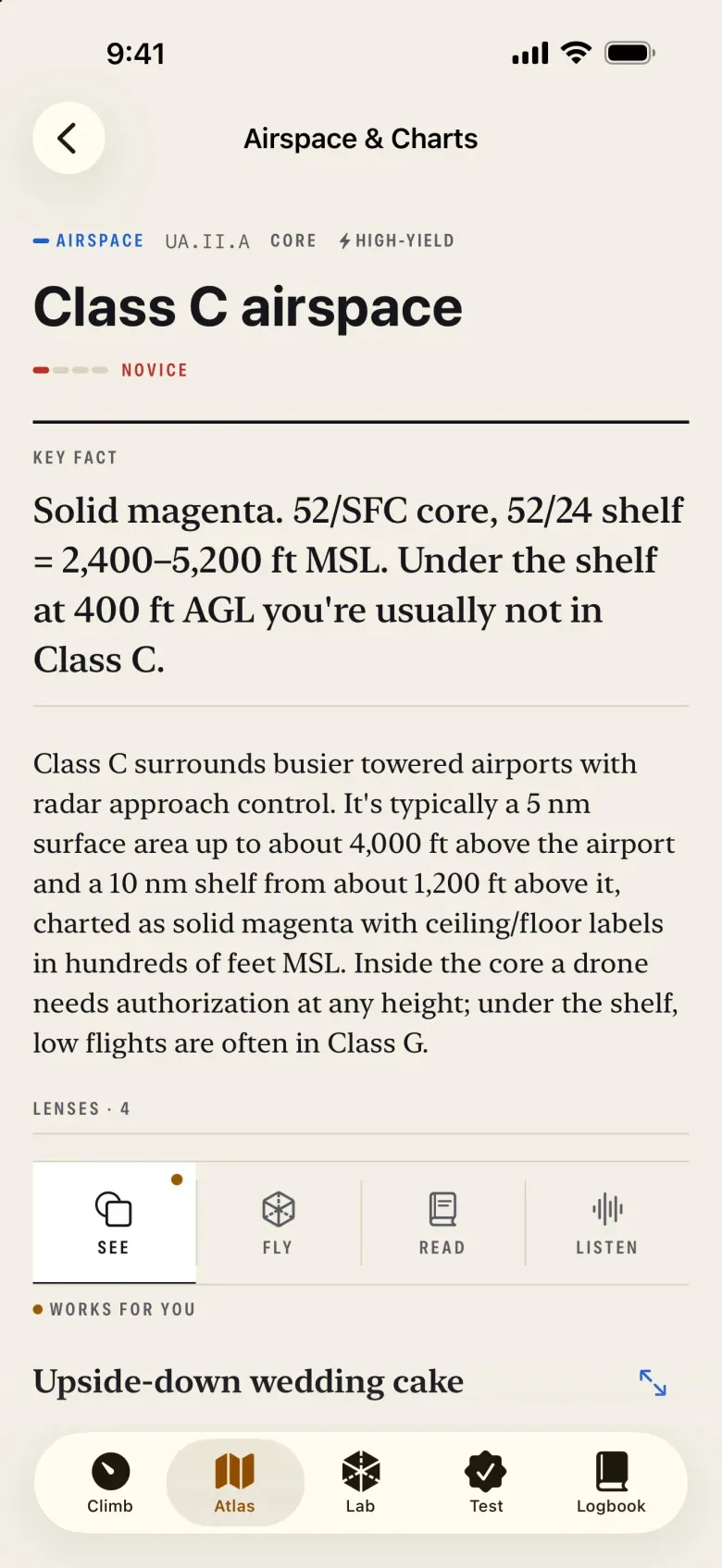
Sixty concepts across the five knowledge areas (regulations, airspace, operations, weather, and loading and performance) are laid out as an atlas you can browse. Each one opens with its key fact, a short summary, and the lessons that teach it. Then four habits do the work.

01The Certainty Dial

Say how sure you are, before the answer locks.

In practice, each question asks you to set the dial to Guessing, Leaning or Certain before the answer locks; in a checkride it rides along at Leaning until you change it. The setting changes what your answer means. A confident wrong answer is a misconception, and Ascend goes after it. A lucky guess barely counts toward mastery, because it proves very little.

Certain and wrong is the one worth fixing.
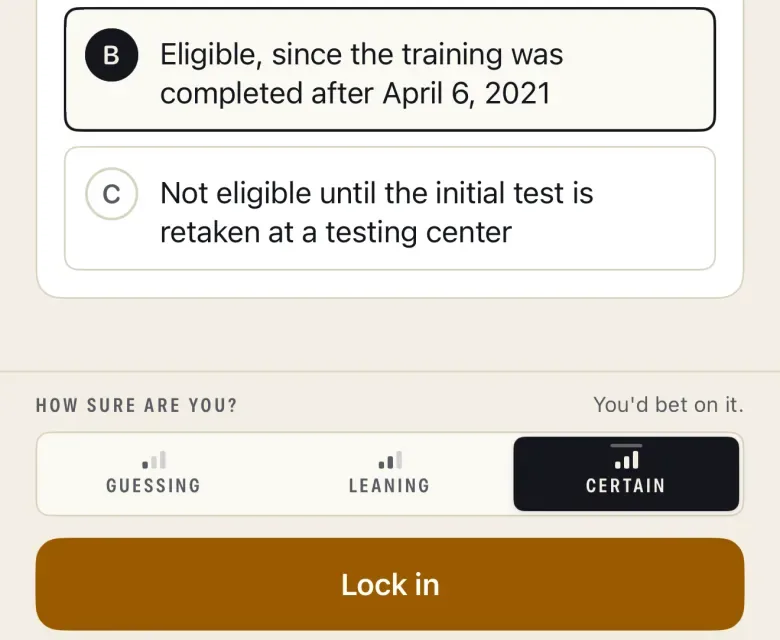
Detail of a question about night operations after recurrent training. Choice B is selected, and below it the Certainty Dial, headed How sure are you?, is set to Certain, above a Lock in button.
Fig. 1 The dial, set to Certain, before the answer locks.

02The Why Probe

Right answer. Now, why?

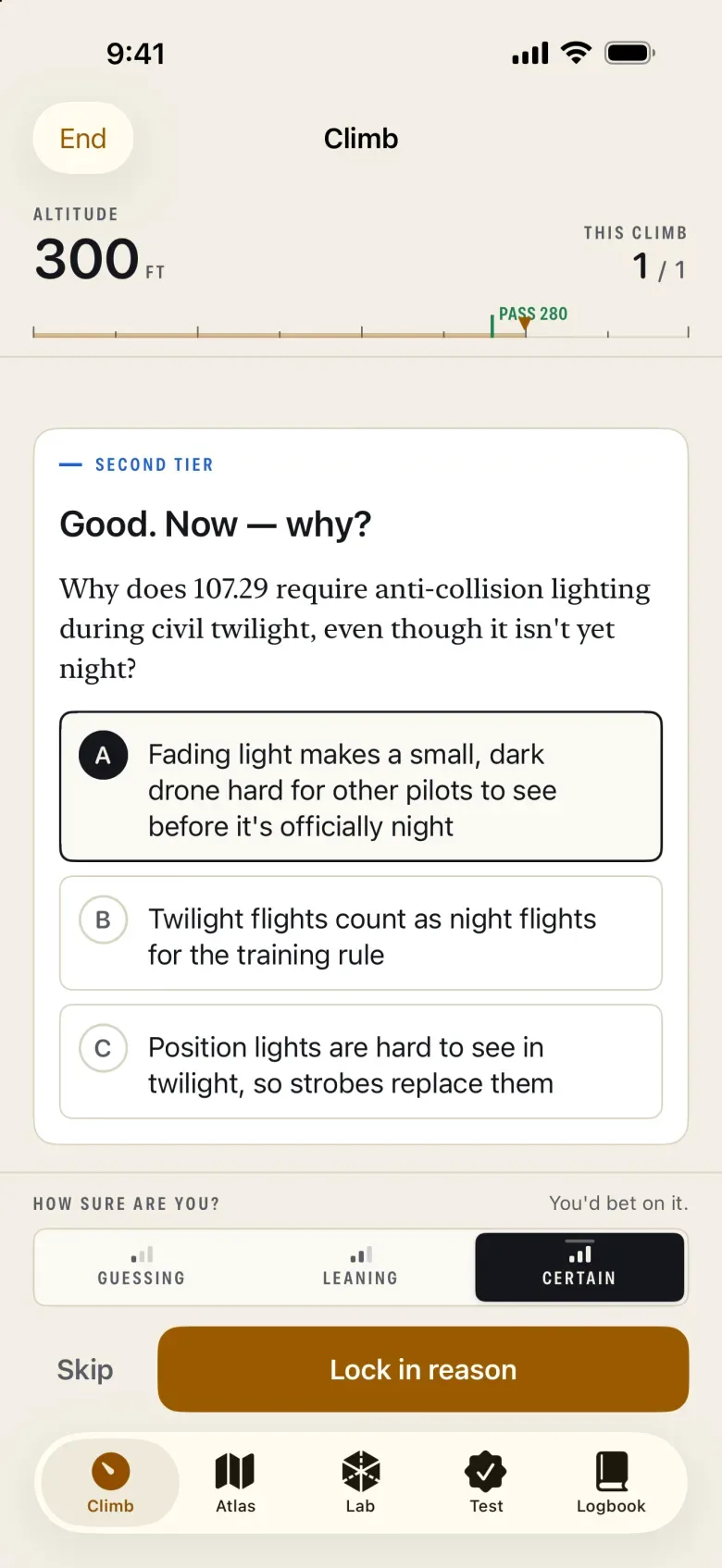
In the climb, after a correct answer that was not a guess, on a concept you have not yet confirmed, the same panel extends into a second tier: three candidate reasons, one of them right. Picking the right letter for the wrong reason is common, and this is where it shows.

A right reason confirms the concept, one of two ways to reach Mastered; the other is a run of four correct answers that were not guesses. There are 87 why probes in the bank.

A second-tier question headed Good. Now, why? It asks why 107.29 requires anti-collision lighting during civil twilight, with three candidate reasons and a Lock in reason button.
Fig. 2 The second tier, on the same question.

03The Misconception Radar

The wrong ideas you hold, on a scope.

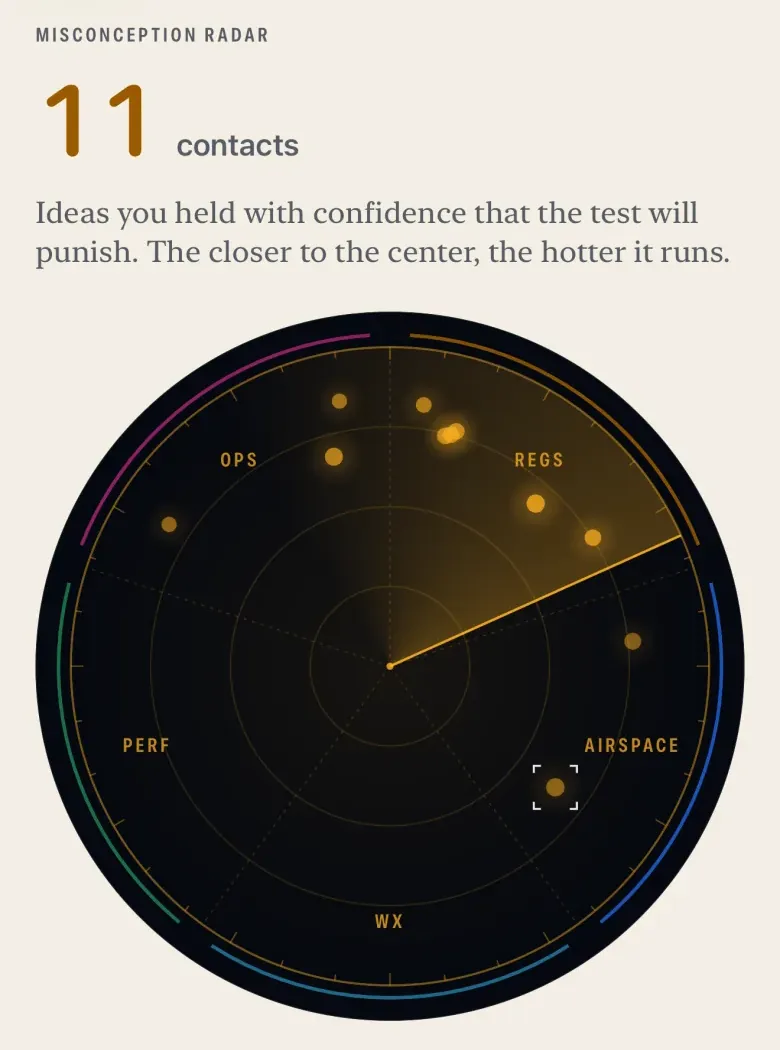
Most wrong choices in the bank, 524 of 720, are tagged with the specific wrong idea they reveal, drawn from 235 named misconceptions, each with its correction. The ones you hold appear as contacts on a radar scope, brightest when they are recent, repeated and confidently held.

Tap a contact to see what you have been thinking, what is actually true, and clear it with a targeted re-teach and a re-test.

The Misconception Radar showing 11 contacts on a circular scope divided into regulations, airspace, weather, performance and operations.
Fig. 3 Eleven contacts; the closer to the center, the hotter.

04Six lenses

The same idea, taught the way it lands for you.

Every concept is taught three to five ways, 226 lessons in all, across six lenses:

Read
an editorial lesson
See
a diagram
Watch
an animation
Fly
a 3D model you move through
Listen
a narrated briefing, with captions
Try
a hands-on tool or scenario

After a miss, Ascend re-teaches through the lens that has worked best for you, then a different one, then tests again. The app learns which lenses those are as you study.

The Class C airspace concept: a key fact about the 52/SFC core and 52/24 shelf, a summary paragraph, and a lens picker with See, Fly, Read and Listen, where See is marked Works for you.
Fig. 4 A concept, its key fact, and four lenses.

IIIAscend County

One county, three ways in.

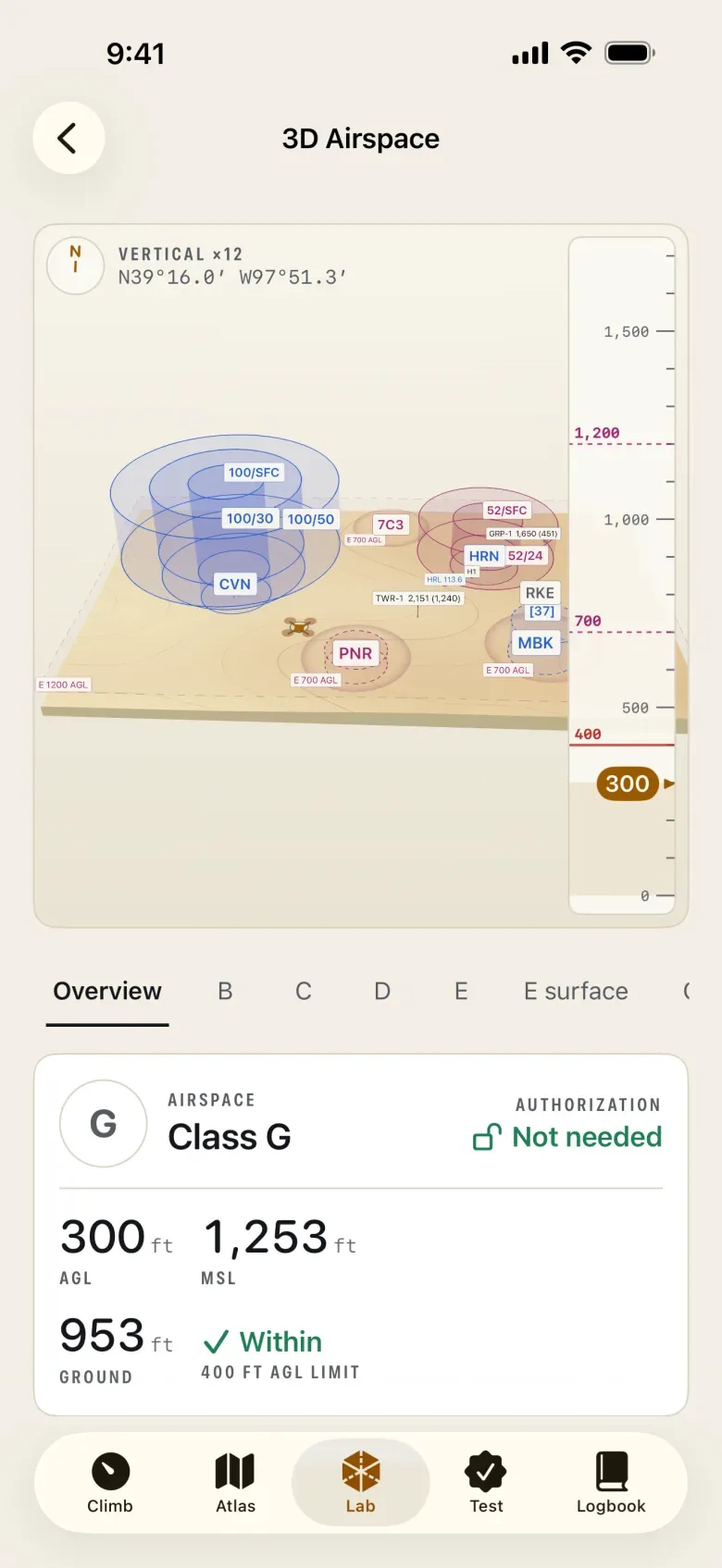
Ascend County is an original, fictional sectional chart drawn for the app. The 3D airspace explorer, the Sectional Lab and the chart questions all use the same county, so the Class C shelf you fly under in 3D is the one you read on the chart, and the one a question asks you about.

A 3D view of Ascend County’s airspace: stacked controlled-airspace volumes, among them Corvin’s Class B, over the terrain, and an altitude tape reading 300 feet. The panel below reads Class G, authorization not needed.
Fly it 3D airspace, at the altitude you choose.
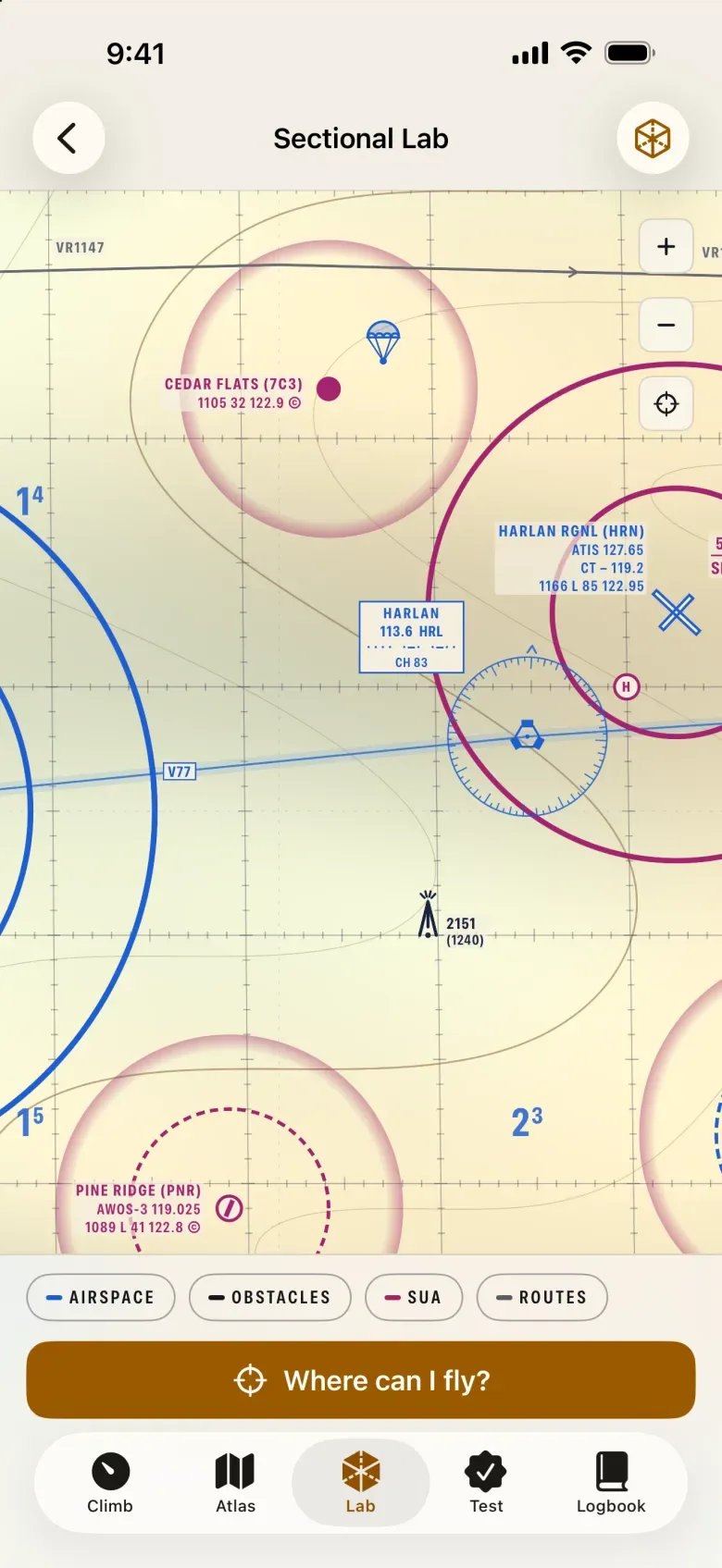
The Ascend County sectional chart in the Sectional Lab, showing Harlan Regional's Class C rings, Cedar Flats and Pine Ridge airports, a VOR, an obstacle, layer toggles and a Where can I fly? button.
Read it The Sectional Lab, with layers and “Where can I fly?”
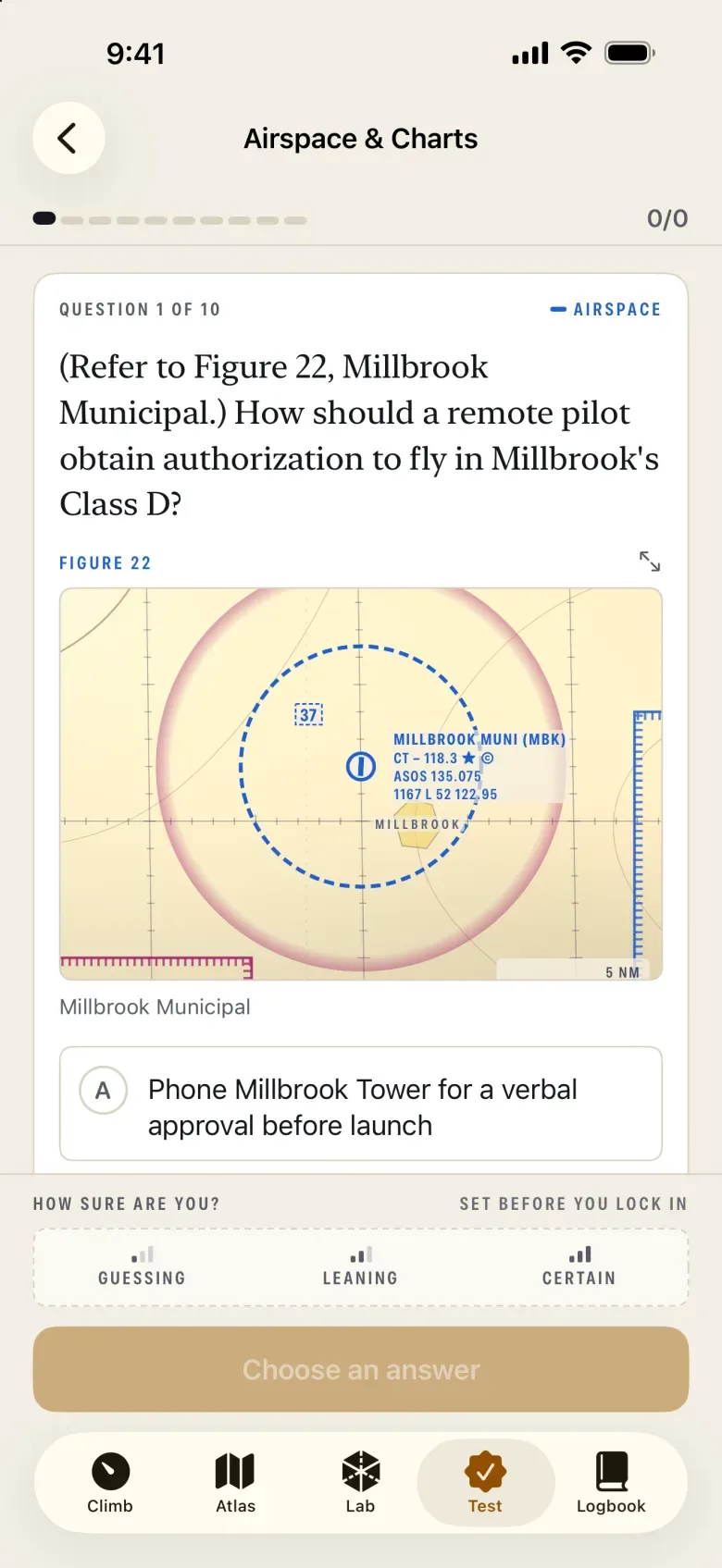
A chart question referring to Figure 22, Millbrook Municipal, asking how a remote pilot should obtain authorization to fly in Millbrook's Class D, with a chart excerpt above the answer choices.
Answer on it One of 55 questions set on the county.

Twelve sorties put you on a job there, from a roof inspection at dusk to a night search, and score each decision you make as evidence about a concept.

The county is fictional and drawn for practice. Never use it for navigation.

IVThe Lab

Ten instruments, each a working tool.

The tools that lessons borrow also stand on their own, for when you want to turn a dial and watch what changes.

  1. 013D AirspaceAscend County’s airspace in three dimensions
  2. 02Sectional ChartThe county chart, with layers and “Where can I fly?” at 400 ft AGL
  3. 03METAR DecoderDecoded and checked against Part 107 weather minimums
  4. 04TAF TimelineA forecast laid out across its valid period
  5. 05Density AltitudeTemperature, pressure and elevation, worked through
  6. 06Load FactorBank the wings; watch load and stall speed rise
  7. 07Weight & BalancePayload, limits and the center of gravity
  8. 08Operations Over PeopleThe four categories, side by side
  9. 09Accident ReportingThe “Do I report this?” decision tree
  10. 10Latitude & LongitudeFind a point on the chart by its coordinates

Behind them, a reference library of 60 entries from 14 CFR Parts 107, 89, 48, 91 and 99, AC 107-2A, the Remote Pilot Study Guide and the AIM.

VPractice and the checkride

The real format, rehearsed until it is familiar.

Questions
60
Hours
2
To pass
70%

The Part 107 knowledge test, per the FAA Airman Knowledge Testing Matrix.

The checkride is the full simulation: 60 questions drawn from all five knowledge areas, a 120-minute clock, flag and skip as you would at the testing center (plus a pause the testing center will not give you), and nothing revealed until you submit. Then a debrief walks through every item with its reasoning and source, and queues what you missed for re-study in one tap.

Between checkrides, 360 exam-style questions do the daily work. Each has an explanation, a note on why the other choices fail, and a cited source.

  • Checkride60 Q · 120 min
  • Timed drill30 Q · 60 min
  • Quick check10 Q · 20 min
  • Practice setsBy area
  • Adaptive climbUnlimited

VIThe flight deck

Know where you stand, in feet.

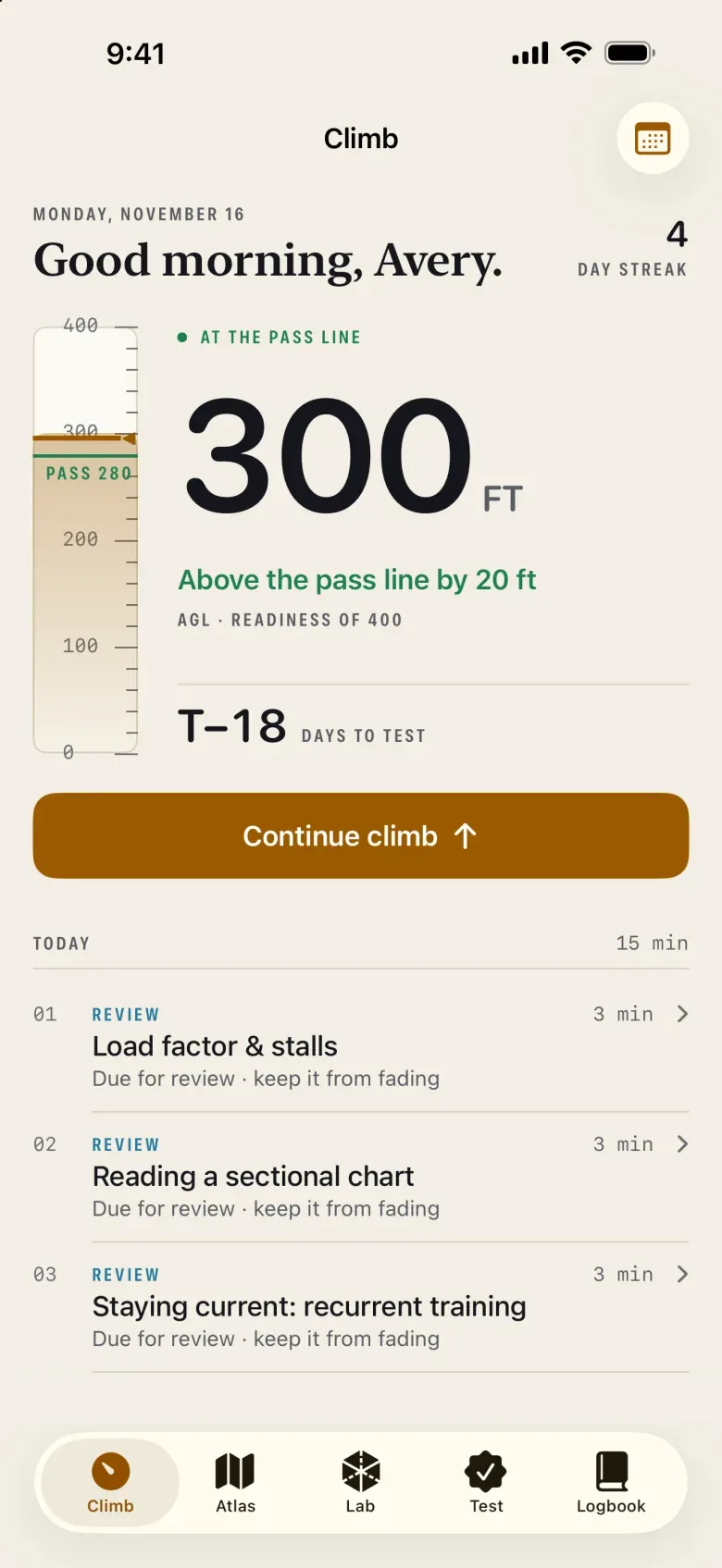
The Climb tab opens on an altimeter. Readiness reads from 0 to 400 ft, the pass line sits at 280, and the needle moves as you learn. The app names what is holding you down, and today’s plan says what to study next. Set a test date and the plan becomes a daily pace.

The score blends mastery of each concept, how much of the material you have practiced, and, once you have taken one, your recent checkrides and 30-question drills. The status only reads Cleared for the test when all three of these hold:

  • Readiness320 ft (80%)
  • Coverage80% or more
  • Full checkride, last 14 days75% or better

The Logbook keeps the rest: the readiness breakdown, a map of mastery across all 60 concepts, and a calibration chart that compares how sure you said you were with how often you were right.

A study gauge, not a prediction of your result.

The Flight Deck: an altimeter tape beside a large readout of 300 feet, above the pass line by 20 feet, 18 days to the test, a Continue climb button, and today's plan of reviews and lessons.
Fig. 5 The Flight Deck for a demo learner, 18 days out.

VIIWhat is inside

The bundled content, counted.

Concepts
60
Lessons, six lenses
226
Exam-style questions
360
On a figure or chart
69
Why probes
87
Named misconceptions
235
Sorties
12
Lab instruments
10
Reference entries
60

Every one of the 447 questions, probes included, cites its primary source. All of it is bundled with the app.

VIIIFree and Full Access

Start free. Unlock once.

Free

  • 18 of the 60 concepts: the first three in each area, and what they build on
  • Every Lab instrument
  • All twelve sorties
  • Adaptive practice and timed drills within those concepts
  • One full checkride

Full Access

  • Every concept and its lenses
  • Unlimited checkrides
  • Content updates for every concept, included
  • Family Sharing

One-time purchase, no subscription. The price is shown in the App Store.

IXPrivacy

Nothing to sign up for. Nothing sent.

There is no account and no sign-in. No ads, no analytics, no tracking. The app collects no data and has no server of its own; your study record lives on your device and studying works without a connection. Only buying, restoring or pricing Full Access talks to the App Store.

This site keeps to the same rule: no cookies, no scripts, nothing loaded from anywhere else. Read the privacy policy.

  • AccountNone
  • Ads, analytics, trackingNone
  • Data collectedNone
  • Study recordOn device
  • Connection neededNo

XQuestions

Asked before you download.

Is Ascend 107 connected with the FAA?

No. It is an independent study aid, not affiliated with, endorsed by or sponsored by the Federal Aviation Administration. Regulations change, so check the current text of 14 CFR Part 107 before you fly.

Will it get me through the test?

Nobody can promise that. Ascend is built to make you reason through questions rather than recognize them, and to tell you plainly where you stand. Readiness altitude is a study gauge, not a prediction of your score.

What does the knowledge test look like?

60 multiple-choice questions in two hours, and you need 70% to pass. The FAA’s minimum age to take it is 14. Ascend’s checkride uses the same count, clock and pass mark.

Does my progress sync between iPhone and iPad?

No. Progress stays on the device where you study; there is no account and the app does not use iCloud. Full Access follows your Apple Account, so you can restore it on each device.

Do I need an internet connection?

No. Lessons, questions, the chart and every tool are bundled with the app. Only buying or restoring Full Access, and showing its price, needs the App Store.

Is Ascend County a real place?

No. It is a fictional county drawn for practice, with its own airports and airspace. Never use it for navigation.

More on restoring purchases, resetting, and reporting a content error on the support page.

Ascend 107 · iPhone and iPad

Start at 0 ft. Climb from there.

Free to download, with 18 concepts, every Lab instrument and one full checkride. Full Access is a one-time purchase.

Coming soon to the App Store

Requires iOS 17 or laterNo accountWorks offline